Monday, 29 July 2013

How To Dual Boot Ubuntu With Windows (EFI Booting)

How To Dual Boot Ubuntu With Windows (EFI Booting)-zezr


So, many of you might be having problems on dual booting windows and ubuntu on a EFI enabled machine. Well this is because the grub boot loader is not able to recognize the GUID (GPT) Partitions used. Sometimes when you install ubuntu alongside with windows, It would directly load into Windows without showing grub menu, or it would load into ubuntu without showing grub menu.

There are many ways to fix this problem, Here i will be showing an easy way to fix this problem.
We will use a tool called "Boot Repair" to fix the grub loader.

So first of all, If your system loads directly into ubuntu without showing grub, half of your work is done

Now all you need to do is, open up the terminal (Ctrl + Alt + T) and type these lines:

sudo add-apt-repository ppa:yannubuntu/boot-repair
sudo apt-get update
sudo apt-get install boot-repair

Now after Installing Boot Repair open it up and click "Recommended Repair". Thats it. The software will do all the work for you. After its done reboot your computer, you should see the grub menu with "Windows Boot UEFI Loader" listed in it.

Now If you're system is booting directly to windows without showing grub menu, than you have to insert the installation media (Live USB/CD) and install Boot Repair as I've shown before.


Hope This Helps.


How To Permanently Delete A Facebook Account?

How To Permanently Delete A Facebook Account?-zezr


Here is the direct link to the official Facebook account deletion page.

click here to delete your account permanently...

Read the step-by-step guide for a clean, dignified exit.

The account of a deceased family member can be memorialized or deleted.

The Facebook Account Deletion Process

Your account will be ‘deactivated’ for two weeks. After this period it will be permanently deleted.
Do not login to your account during this time, it will cancel the deletion request.
Consider an account deletion epitaph to notify friends of your departure.

What Happens To Your Data?


In theory, deleting your account immediately removes all Facebook data related to you. In reality it's more complicated, taking about a month.
Allegations of complicity with US National Security Agency surveillance suggest that your data may never truly be deleted.
You can still cleanse your Facebook presence for everyone else,
  • Delete any sensitive content that you have posted.
  • Contact friends about content that you would like deleted.
Backup your data before deletion if you'd like a copy.

Leaving Social Data Behind

As hard as you try, some personally identifiable information may remain. This could be something as simple as your name on a message.
You have little control over this or what others share about you in future. The most you can realistically do is ask your friends to respect your privacy.
Data shared with apps and advertisers is with them forever. As a Facebook user you are leaving behind a valuable personal data footprint.

Sunday, 28 July 2013

Mini UPS System For Router/Mobile Charger – DIY Project


Mini UPS System For Router/Mobile Charger – DIY Project

If you are tired of load shedding problems and want to have a mini UPS system which can power up your home router for internet purposes and also charge your mobile phone then here is a circuit for you to do it yourself and get along with the load shedding problems. The circuit provides an un-interrupted power supply (UPS) to operate 12V,9V and 5V DC-powered instruments at up to 1A current. Its not a pretty difficult circuit to make and the only expensive component in the whole circuit is the 12V battery. 


Components Required:

  • 12V (4.5 Ah) Battery
  • 12-0-12 V , 1A Center Taped Transformer
  • 4x 1N4007 Diode
  • Zener Diode 10.5V (0.5W)
  • Zener Diode 12V (1W)
  • 3x LEDs (Red,White,White)
  • 68 ohm Resistance (0.5W)
  • 2x 1 Kohm Resistance
  • 47 ohm Resistance (1W)
  • 2x 390 ohm Resistance
  • Pot 10 Kohm Variable Resistance
  • Pot 22 Kohm Variable Resistance
  • 470 uF Capacitor (25V)
  • Transistor BC548
  • Transistor TIP 127
  • IC 7809
  • IC 7805
  • On/Off Switch

Circuit Diagram:


Working: 

The backup battery takes up the load without spikes or delay when the mains power gets interrupted.It can also be used as a workbench power supply that provides 12V,9V and 5V operating voltages.The circuit immediately disconnects the load when the battery voltage reduces to 10.5V to prevent deep discharge of the battery.LED1 indication is provided to show the full charge voltage level of the battery. miniature white LEDs (LED2 and LED3) are used as emergency lamps during power failure at night. A standard step-down transformer provides 12V of AC,which is rectified by diodes D1 and D2.Capacitor C1 provides ripple-free DC to charge the battery and to the remaining circuit.When the mains power is on,diode D3 gets forward biased to charge the battery.Resistor R1 limits the charging current.Potentiometer VR1 (10k) with transistor T1 acts as the voltage comparator to indicate the voltage level.VR1 is so adjusted that LED1 is in the ‘off’ mode when the battery is fully charged,LED1 glows indicating a full voltage level of 12V. When the mains power fails,diode D3 gets reverse biased and D4 gets forward biased so that the battery can automatically take up the load without any delay.When the battery voltage or input voltage falls below 10.5V, a cut-off circuit is used to prevent deep discharging of the battery.Resistor R3, zener diode ZD1 (10.5V) and transistor T2 form the cut-off circuit. When the voltage level is above 10.5V,transistor T2 conducts and its base becomes negative (as set by R3, VR2 and ZD1).But when the voltage reduces below 10.5V,the zener diode stops conduction and the base voltage of transistor T2 becomes positive.It goes into the ‘cut-off’ mode and prevents the current in the output stage.Preset VR2 (22k) adjusts the voltage below 0.6V to make T2 work if the voltage is above 10.5V. When power from the mains is available,all output voltages 12V,9V and 5V are ready to run the load.On the other hand,when the mains power is down,output voltages can run the load only when the battery is fully charged (as indicated by LED1).For the partially charged battery,only 9V and 5V are available.Also,no output is available when the voltage goes below 10.5V.If battery voltage varies between 10.5V and 13V,output at terminal A may also vary between 10.5V and 12V,when the UPS system is in battery mode. Outputs at points B and C provide 9V and 5V,respectively,through regulator ICs (IC1 and IC2),while output A provides 12V through the zener diode.The emergency lamp uses two ultra-bright white LEDs (LED2 and LED3) with current limiting resistors R5 and R6.The lamp can be manually switched ‘on’ and ‘off’ by S1.

 Precautions: 

The circuit should be assembled on a general-purpose PCB or Vero Board.There must be adequate space between the components to avoid overlapping. Heat sinks for transistor T2 and regulator ICs (7809 and 7805) to dissipate heat must be used. The positive and negative rails should be strong enough to handle high current. Before connecting the circuit to the battery and transformer,connect it to a variable power supply.Provide 12V DC and adjust VR1 till LED1 glows.After setting the high voltage level,reduce the voltage to 10.5V and adjust VR2 till the output trips off. After the settings are complete,remove the variable power supply and connect a fully-charged battery to the terminals and see that LED1 is on. After making all the adjustments connect the circuit to the battery and transformer. You can now connect your internet router to the 12v supply and use the 5v output for charging your mobile phone.

EASY STEPS TO PROTECT YOUR ANDROID PHONE !

As in my previous post i informed you about the rapid growth of malware in Android devices and Google is facing problems regarding these malwares. Now Google has also recently announced Bouncer, which keeps malicious apps away from the Android Market . Today i will give you some important measures you should take to avoid malwares  attacks .
First of all install a Antivirus program. You can easy find & download many security apps from Google play store but the most efficient and recommended security apps are Avast Free Mobile SecurityDr Web antivirus, F- Secure mobile security, Ikarus mobile security, Kaspersky antivirus,  lookout, Avg & Eset securities .
I have used Avg , Kasperspy, lookout , Avast & Eset securities and in these i found ESET antivirus was good As it catches 2 game apps that were infected.It also stops third party apps from installing, but its a trial version only for 1 month :( .   Now its upto you which one you install.
vcsPRAsset_1087826_65964_d8640ec5-9033-456e-91f3-a24155ff6fc3_0

Secondly, Download Apps Only from Trusted Sources like Google play and amazon app store and stay away from third arty apps as much as you can .
Thirdly, Protect Your Phone with a Password it saves you from manual hacking when your phone is stolen.
Fourthly, Install OS Updates as Soon as They’re Available as with every update, Google routinely closes up holes that malware authors can exploit.
Lastly, Don’t View Sensitive Information on Public WI-Fi. Wi-Fi is one of the most beneficial inventions, But the problem is if you are using Wi-Fi network that is unsecured, you should think twice about doing anything particularly sensitive.
android-malware-300x200 android-security-apps

How Google just quietly made your Android phone more secure?

How Google just quietly made your Android phone more secure?

By now, you've probably heard all about the changes introduced withGoogle's Android 4.3 release. But those fresh features and bits of polish are only part of the story. One of Google's biggest changes to the Android platform is actually happening outside of the operating system -- and it's affecting almost every Android device in the world.
It's the widespread launch of a universal app-scanning system -- a system that watches your device for any new application, even one loaded directly onto the device ("sideloaded") from outside of the Google Play Store, and instantly checks the app for malicious or potentially harmful code.
That's huge. And while we've been busy focusing on new devices and fun features, Google's been busy making sure every Android user has that system on his phone -- whether he realizes it or not.
Google initially launched the feature, known as Verify Apps, with Android 4.2last November (Android VP of Engineering Hiroshi Lockheimer discussed it with me exclusively at the time). Now, Google has pulled the program out of the OS and made it automatically available to every device running Android 2.3 or higher. That covers almost every phone and tablet out there -- about 95 percent of the actively running products, according to Google's latest platform measurements.
How did that happen? Simple: Google made the code a part of Google Play Services, a standalone utility that's updated regularly behind-the-scenes by Google -- independent of any manufacturer or carrier rollouts. It's part of the ongoing deconstruction of Android that we've been talking about for a while now.
The new system works alongside an automated scanning system that's been in place since early 2012 for all apps on the Google Play Store. With the new device-level scanning added into the picture, that means every app you put on your phone -- whether from the Play Store or from an unofficial third-party source -- is now scanned, analyzed, and compared to a massive database of malicious code, all in a fraction of a second.
On the Play Store side, if something is flagged as problematic, it won't be published. On your device, if a red flag comes up -- even just for something as seemingly innocuous as an app that might send SMS messages on your behalf without your knowledge -- the system will warn you and recommend you avoid proceeding with the installation.
"We wanted to make sure those protections were available even for users who were choosing to install applications from a source other than Google Play," Android Security Engineer Adrian Ludwig tells me. "It's always been a focus for Android to make sure that we're supporting an open ecosystem and that it's possible for users to get applications that developers, for any number of reasons, aren't distributing through [the official Play Store channel]."
Android Verify AppsJust like in its original 4.2-based incarnation, the newly widespread Verify Apps feature is on by default but can be bypassed or disabled if you want. The system prompts you the first time you install something from outside of the Play Store and confirms that you want its protection; even if you opt in then, you can always disregard its advice and proceed with a flagged app installation down the road, if you're so inclined.
So in the big picture, what's this all mean? Simple: All those big, bad, scary Android malware stories we're constantly seeing are even more blown out of proportion than ever. They've always been sensational; all it takes is a little basic caution and common sense to avoid having your device devoured by an evil mobile genie. In the real world, the killer viruses that are so good for headlines actually affect next to no one. But now, even if you aren't careful -- even if you do carelessly download shady-looking stuff from out in the wild -- your phone will automatically protect you.
Android Malware

And there's the rub: That means the pay-to-play programs pushed by antivirus vendors -- the same companies that, coincidentally, are almost always behind the press campaigns surrounding the big, bad Android malware of the moment -- are now completely redundant with the protection provided by the operating system itself. Not that that'll stop the vendors from trying to scare you into using their products.

Beyond the Verify Apps expansion, Android 4.3 itself includes a number of OS-level security enhancements. Perhaps most significant is the addition of a security feature called SELinux -- or Security-Enhanced Linux -- which protects certain core aspects of the system's functionality.
There's also an apparently still-under-development feature known as App Ops that allows users to selectively disable permissions from installed applications. (Android, unlike other mobile operating systems, requires all apps to request specific permissions in order to gain access to any function of the device or area of user data -- and those permissions are always disclosed to the user prior to installation.) The function was discovered by the gang at Android Policeand has yet to make its public debut.
All combined, there's less reason than ever to panic the next time the inevitable "OMG THE ANDROID MALWARE MONSTER IS COMING!!!" story comes along. And it will: If history's any indication, we'll probably see another such story and accompanying set of fear-inducing headlines within a matter of weeks.
But a little bit of knowledge goes a long way. Here in the real world, the monsters aren't nearly as scary as the storytellers make them out to be.

Data Communications and Networking – Behrouz A. Forouzan.Fourth Edition


A comprehensive introduction to networking technologies. It should be accessible to students from all backgrounds and uses many figures to visually represent concepts. This third edition is updated to reflect developments in the field, and optional algorithm sections have been added.

Say GoodBye to G+ Local: Leaving iOS on 7th August

Google has made some very serious decision regarding putting a stop to certain apps, amongst those is Google+ Local service Google specifically devised for iOS few months back. It appears the service has to go down the line of early retirement as Google announced the withdrawal of this iOS service on the 7th Of August.
Google+ Local
This information has been confirmed by an email being received by users of Google Maps declaring all services including localized dining, shopping and entertainment discover application will cease to work by August 7. The decision has been based on the consequences of the same features being incorporated in the updated version of iOS Google Maps.
Although users will not be able to use Google+ Local for iOS service from August 7 onwards, still, all the user data including reviews, any ratings or related information will automatically be saved on Google+, being available to users when they log into Google Maps again.
Google+ Local is not the first service to be shut down in fact Google has put down a number of other services over a couple of months. These include services like Google Reader followed by Google Latitude.  Continuing Google+ Local, though, would have been of no use since all the data it provided is now readily available in Google Maps for iOS. The app might already be taken out from iTunes since any link directing to the app says, “the item you’ve requested is not currently available in the U.S. Store.”

Saturday, 27 July 2013

How to develop Pre-Schooler's Brains


                                                 How to develop Pre-Schooler's Brains

                                                 How to develop Pre-Schooler's Brains

A youth human brain is a chaotic jungle of neurons getting "wired" together into intricate circuitry patterns. Early experiences have an enormous influence on children's absorbent sponge-like brains and also strongly affect the way they mature. By providing everyday activities that arouse your child's curiosity, you’re helping to create neural pathways that will increase their learning efficiency and capacity. Expose your preschooler to a variety of stimuli and allow your child hands-on interaction with three-dimensional materials. Cooking, finger-painting, clay construction, musical instruments, and going to festivals, petting zoos, museums, tide pools, concerts, and outdoor natural areas are all sensory-rich activities.

Children need to feel safe and confident. You can minimize stress by giving your child positive, loving, sensitive, and encouraging feedback. Keep reprimands and threats to a minimum, avoid unnecessary power struggles, and shouting or spanking in discipline. Also, be patient about bedwetting, be sympathetic about fear of nightmares, the dark, and thunder-and-lighting storms, and allow your child to have a security object like a cozy blanket or a stuffed toy.

Preschool is prime time for auditory brain development. Supporting your child's hearing and speaking helps construct strong neural circuitry for absorption of more language acquisition. Ideally, talk, sing, and read to your child in a voice that varies in pitch and rhythm and emphasizes important words. (If we mumble in a flat drone your child will get bored and not focus.) Try to ask open-ended questions that initiate thinking, explain "how things work," use high-level vocabulary, and regularly include your child in conversations that will help expand their vocabulary. Protect your child's hearing by treating ear infections promptly, and encourage her to "use her words" instead of throwing tantrums. Preschool is also an ideal time to introduce a second language since the young, "plastic" brain absorbs language quickly.

If possible, enroll your child in a quality preschool or schedule regular play dates with friends. Encourage your child's fantasy play with friends — "pretend" games develop the brain's verbal zones and enhance social skills in sharing, communication, and conflict resolution. Allow your child to have "imaginary friends" for the same reason, but remember, preschoolers have difficulty separating reality from make-believe, so don't call them "liars" if they insist that their stories are "true."

How to Save Files to the Cloud


                        How to Save Files to the Cloud


                        How to Save Files to the Cloud

 Still haven't jumped onto the cloud bandwagon? Never fear. Cloud storage is a great way to make sure your files are preserved without taking up vast amounts of space on your PC. Even better, it's often completely free. Whether you've got documents, photos or music -- or any combination thereof -- here's how to make sure your digital treasures don't get lost.


Personal file storage on a computer used to involve a PC-based hierarchical folder system that was maintained on local, PC-based hard drives.
Today we are embracing the cloud, which allows for redundancy, remote access, remote backup and the use of convenient input/output mobile devices like phones with limited storage but outstanding portability.
If you're still using your PC as a catch-all repository for media and documents and haven't moved over to the cloud yet, here's how to go about trying it painlessly -- and at no cost to you.
I've chosen two broad file types that are well-suited to the cloud. Each has unique services geared towards it, and both demonstrate cloud-services principles that you can try.


Cloud Documents and Photographs Using Dropbox

Step 1: Browse to the Dropbox website on a computer. This service allows you to access files saved across all of your disparate computers and phones, regardless of OS.
For all intents and purposes, it lets you bring your files with you, without e-mailing them to yourself, as long as you have an Internet connection.
Step 2: Sign up for a basic, free account at the website by entering your name, e-mail and a password and pressing the 'Sign Up' button. A Dropbox client will download. Choose 'Save' when prompted and open the Dropbox installer. Then follow the run and setup prompts.

Step 3: Launch the Dropbox folder on your computer by clicking on the newly created desktop icon (in Windows 7). The folder will open and appear as a regular Windows folder.
From the Start menu, browse to Documents within Libraries and open it. Drag a sample file, like a Word document or image from Documents, to the new Dropbox folder.
Step 4: Install Dropbox on other machines or download an app from your phone's market or store. Sign in and browse to your Dropbox folder, which will be created on the other machines and devices.
Check the installations and you'll see that the file name you dragged over will be synced across devices and on the Dropbox website. Click or touch the file name to download the actual file to that machine or device.
Step 5: Make a change to the file. Changing the file name will demonstrate this step. The change will sync across all of the Dropbox-enabled devices and on the Dropbox website.

Cloud Music for Android Using Google Play


Step 1: Browse to the Google Play Music website on a computer. This service allows you to store music and listen on the Web without taking files with you. Up to 20,000 songs are stored for free. iTunes, Windows Media Player and regular folders can all be indexed.
You can also add to your collection and get free music from new artists by using the integrated Google Play store.
Step 2: Open a Google account or sign in to an existing account and then download the Music Manager by clicking on the blue 'Download Music Manager' button.
Follow the prompts to install the Music Manager and then click through the setup's Next buttons to sign in again and add your personal collection to your Google Play music library. The music will sync.
Step 3: Launch the actual Music Manager software from the Start menu (in Windows 7) and you'll see the interface. Click on the 'Go To Music Player' button, and your synced music library will appear in a Web browser.
Step 4: Click on 'Shop Music' and 'Free Song of the Day' to add new music to your Music Manager. This music will sync.
Step 5: Open the Google Play store on your mobile device and search for the free Google Play Music app. Install it on your device. Follow the prompts to add your Google account and you'll see the music synced in the previous steps.
 Touch artwork or an icon, and the music will play.

Thursday, 25 July 2013

Ubuntu Edge Campaign


Ubuntu Edge Campaign: ‘The Future of the Phone’ worth $32 Million


Canonical, the producers of very well-known OS Ubuntu believe the future lies in the concept of ‘Convergence’ and hence they are coming forward with their latest product ‘Edge’, a Smartphone they claim to jump ahead of all other Smartphones as it will work as a desktop PC as well.
Europe and U.S. Will be entertaining this new Smartphone housing a dual-chip LTE for high-speed 4G internet and is expected to have a minimum of 128GB internal storage all in all backed by a4GB RAM. Though there has been no official announcement on the details of the processor but Ubuntu has ensured users it is going to integrate the fastest one claiming the phone to be “a potent little PC when docked.”
Mark Shuttleworth, known for founding Canonical, explained this Smartphone project while releasing the project via a YouTube video that this is a platform for newer types of phone hardware as well as being an exemplary opportunity for financing phone industry which has been claimed far better in comparison with the car industry:
 “With the car industry we have the Formula One to test new technology. But the mobile industry has nothing like that – there’s no premium segment for expert drivers. It’s like everyone is driving mass-produced sedans.”
It is a one shot project with a fixed-funding status that might not succeed lest $32million is collected by 21St Of August. Presently Edge has managed a funding worth $3 million however concerns have been shown regarding Edge’s inconsistent price tags: you can earn a ‘founder’ position by giving away $20 that reaches an unexpected $600 as a limited time offer and $830 to get the Smartphone in your possession.

Feature-wise Edge will come with a 4.5 inch display where the focus has been kept on “color accuracy and brightness” instead of resolution like other companies. Also, the screen is somewhat peculiar since the glass has been substituted by a sapphire crystal, “a material so hard you’ll need diamonds in your pockets to scratch it.” It has a rear camera of 8 megapixels and a front facing one of 2 megapixels. The Edge is going to dual boot both Ubuntu and Android, as promised, that means all apps you bought from Google are safe.
Specifications combined with the appearance as revealed by teaser images are going to attract attention but the major appeal stays with Ubuntu’s idea of ‘Convergence’. The idea of a dual boot PC Smartphone is not new as many of us recall the Motorola Atrix from the year 2011 when we hear of it. However, the company claims Edge has better specs and Ubuntu OS is available both for mobile and desktop will push it towards a better response from users.
Shuttleworth’s “a crazy, beautiful idea” is further explained:
“But if there are enough of us out there – enough enthusiasts who want the ultimate in performance, storage, screen, battery and bandwidth, then the Ubuntu Edge will be the catalyst for awesome innovation and a taste of the future of the phone.”
Come August, we will find out if the project made it to the shore or got drowned somewhere in the sea of new yet unattractive releases.

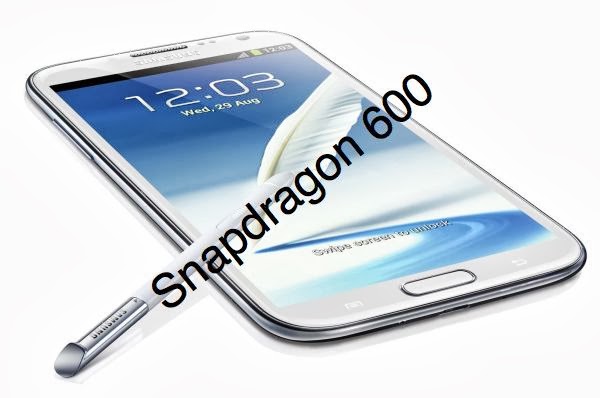
Samsung Galaxy Note 2 to be Revamped with Snapdragon 600 for China

It is about time the Korean firm released the next member of Samsung Note series, the Samsung Galaxy Note III. Samsung released Samsung Galaxy Note II last fall with features and specifications that are no longer among the latest features list. The Korea based firm has decided instead to work a bit with the already popular Note II and make it up-to-date by integrating a powerfulSnapdragon 600 chipset in place of Exynos 4412 it actually housed.
The overhauled Note II makes it clear it is being prepared to be launched in China, good news for Samsung followers who would really like to see S600-based Galaxy Note II. The news has been further confirmed by a listing in the AnTuTu benchmark database straight from China. Also, it is important to note the change in the model number from N7100 to N7108D for the revamped Note II; Chinese identity can be noticed in the last digit in the new model number.
Samsung Galaxy Note 2 to be Revamped with Snapdragon 600 for ChinaThe updated list on AnTuTu is an insight into the specifications to the changes made to Galaxy Note II powered by a solid Snapdragon 600 processor which is said to be clocked at 1.9GHz running Android 4.2.2 Jelly Bean straight from the box.
According to the AnTuTu benchmark scorecard, latest Galaxy Note II has managed to score much higher point, 26,901 points, than the previous Galaxy Note II model that just hit 13,562 points which ensures a more stable and powerful version of Note II.
Samsung has not yet commented on any such device so far. Since there is no confirmation we can only speculate about the rumors circulating over the web. Samsung might be planning to release the new device at an event in China with not much media presents. Media, although, is looking forward to the upcoming Galaxy Note III.

Tuesday, 23 July 2013

MacBook Air 2013 Software Update Available


MacBook Air 2013 Software Update Available; Fixed Wifi Connectivity, Screen Flickering and Adobe Photoshop Issues
MacBook Air 2013 Software Update Available-zezr

Apple recently on Thursday put forward the release of a MacBook Air software update that was specific for its mid 2013 11- and 13-inch models. The software update deals with the issues regarding the  wireless connectivity, Adobe Photoshop and video playback to be precise. This particular update has a file size of 3.35MB, and amazingly is now readily available for the users to enjoy the benefits. MacBook Air users now have the opportunity to download the software update using the Mac App Store or Apple’s website, whatever is the most feasible to them.
MacBook Air 2013 Software Update Available-zezrThe description of MacBook Air (Mid 2013) Software Update 1.0 by Apple goes something like this:
“This update fixes an issue that in rare instances may cause an intermittent loss in wireless connectivity, an issue with Adobe Photoshop which may cause occasional screen flickering, and an issue which may cause audio volume to fluctuate during video playback.”
Plenty of users came forward reporting that severe screen flickering happens while utilizing the Adobe Photoshop on the most recent MacBook Air models, as reported by NDTV Gadgets. The gadget owners also put forward issues on Apple and Adobe support forums. Adobe’s Chris Cox added up the issue to a driver, graphics processor, or LCD driver circuits. Cox too, mentioned that the issue was more precisely connected to the MacBook Air models and was not directly dealing with the photoshop program on its own.
When Apple brought to surface its most recent MacBook Air models back in June, the 802.11ac Wi-Fi support was the most significant and lime lighted feature. The most recent laptop came with a offer of a faster wireless connectivity, anyway many users came up with a report spotty Wi-Fi in the models of 2013.
We are hoping that these issues will be resolved soon by the owners